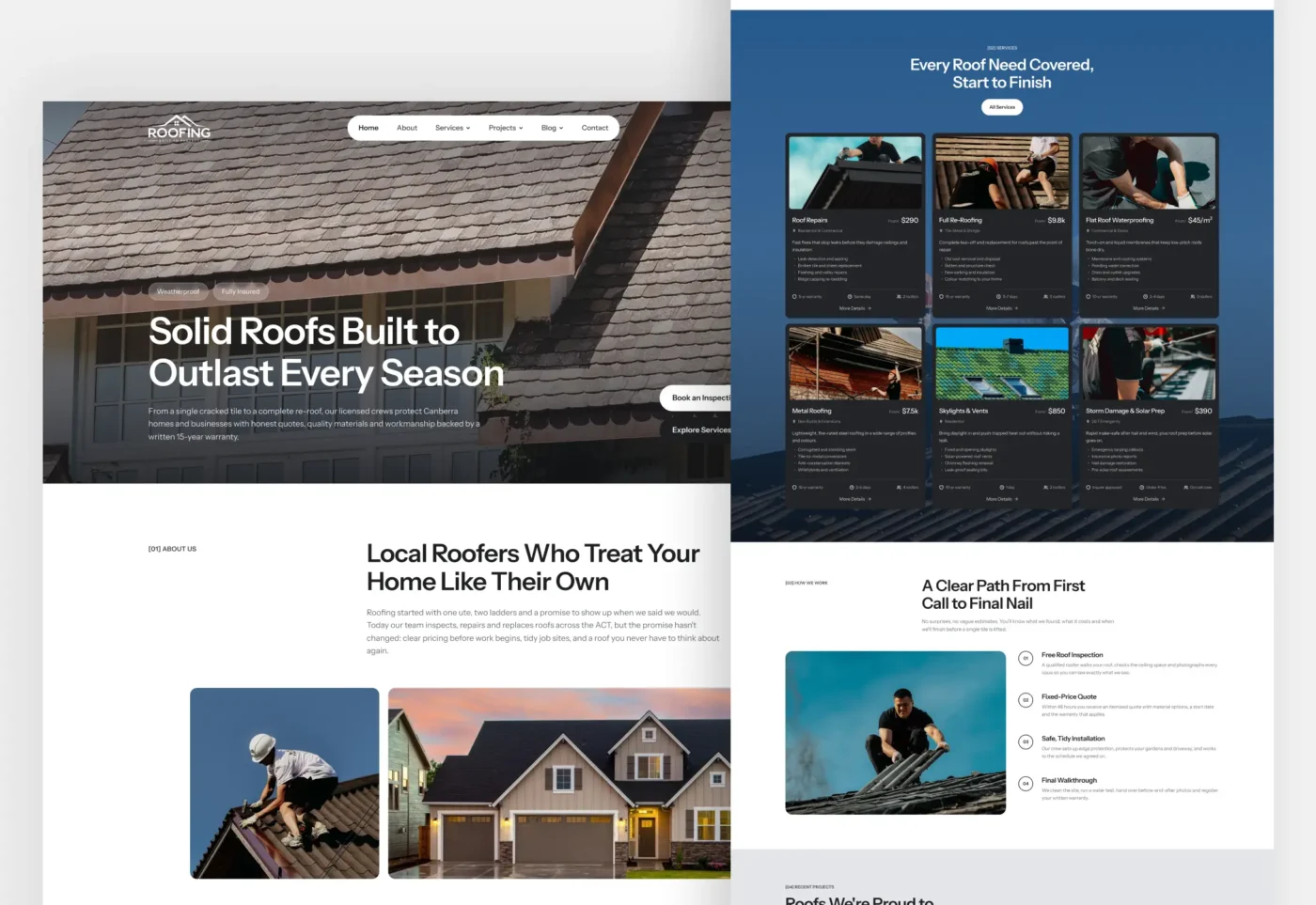
Roofing Pro is a premium Roofing Astro Theme for roofing contractors, roof repair specialists, restoration companies, and construction businesses. It gives you a complete, fast, and search-friendly roofing website in one download. Every page is designed to turn visitors into estimate requests. You get service pages, project case studies, service-area pages, a blog, and lead forms, all ready to customise from one config file.
Built on Astro 7 with plain CSS and vanilla TypeScript, Roofing Pro ships static HTML with no heavy UI framework. Pages load quickly on phones and desktops, which helps both visitors and your search rankings.
Why Choose This Roofing Astro Theme?
Homeowners rarely hire a roofer from a single page. They compare services, look at past work, check the service area, and read reviews before they call. Roofing Pro is structured around that journey. Each section answers a buyer question and points to a clear next step: call now, book an inspection, or request an estimate.
The design is clean, photo-led, and trustworthy. Dark service cards sit over a sky-blue band, project photos fill a bold mosaic, and every page ends with a strong call to action. A floating sticky header keeps the “Get a Free Quote” button in view as visitors scroll.
More Than 50 Pages in One Roofing Astro Theme
This roofing contractor website template includes every page a roofing business needs:
- Homepage with hero, about, stats, services, process, projects, testimonials, FAQ, and blog sections
- About, Our Process, Our Team, Testimonials, and FAQ pages
- Services overview plus nine service detail pages
- Projects portfolio plus six project case studies
- Photo gallery with category filters and a lightbox
- Service-areas overview plus six local area pages
- Blog with featured posts, categories and pagination
- Contact, Request an Estimate, Privacy Policy, Terms and a branded 404 page.
All content lives in Markdown files and typed data files. You can add a service, project, or blog post without touching component code.
Service Pages That Sell Each Job
Every service page uses one reusable template. It shows a “from” price, warranty, typical duration, and crew size at a glance. Below that come what’s included, the benefits, a step-by-step process, materials, and a service-specific FAQ. Related projects appear in a Swiper slider, and related services keep visitors exploring.
Mark a service as featured, and it appears on the homepage and in the header dropdown automatically.
Project Case Studies That Build Trust
Roofing customers want proof. Each case study lists the location, property type, roof system, size, timeline, and completion date. It then explains the challenge, your solution, the full scope of work, and the results. A photo slider shows the job on site, and related projects keep visitors browsing.
The projects archive filters by category (residential, commercial, heritage, new build and multi-unit) without a page reload.
Local SEO Built Into the Theme
A roofing business lives on local search, so this SEO-friendly Roofing Astro Theme does the technical work for you:
- Unique titles, meta descriptions, and canonical URLs on every page
- Open Graph and Twitter cards for clean social sharing
- JSON-LD structured data for RoofingContractor, Service, BlogPosting, FAQPage and BreadcrumbList
- Automatic XML sitemap, robots.txt and RSS feed
- Service-area pages that target suburb and district searches
- Draft posts kept out of production builds
Only real data goes into the schema. The theme never outputs fake ratings or reviews.
Lead Generation Forms That Work
Roofing Pro includes a contact form and a dedicated Request an Estimate form. Visitors choose a property type, service, suburb, timing, and preferred contact method. Service pages pre-select the right service in the estimate form.
Forms use accessible inline validation and a honeypot spam trap. Connect them to Formspree, Web3Forms, Netlify Forms, or your own API endpoint in one setting. Until a provider is connected, demo mode clearly tells visitors their message was not sent.
Fast, Accessible and Fully Responsive
This Roofing Astro Theme is tested at every common screen width, from small phones to wide desktops, with no horizontal scrolling. Swiper loads only on pages that contain a slider. Images include width and height to prevent layout shift, below-the-fold photos load lazily, and the hero image is prioritised.
Accessibility is part of the build. You get a skip link, keyboard-friendly dropdowns, an accessible mobile menu, ARIA-labelled sliders and accordions, visible focus states and labelled form fields. Reduced-motion settings are respected, and key content stays readable with JavaScript turned off.
An Easy-to-Customise Roofing Astro Theme
Change your business name, phone numbers, email, address, opening hours, social links, calls to action, and SEO defaults in a single file: src/config/site.ts. Colours, radii, and spacing live in one CSS tokens file, so rebranding takes minutes.
The theme deploys anywhere static sites run: Netlify, Vercel, Cloudflare Pages, GitHub Pages, or classic Apache and LiteSpeed hosting. A generated .htaccess file handles clean URLs, and one BASE_PATH setting supports installs in a sub-folder.
Who Is This Roofing Website Template For?
- Residential and commercial roofing contractors
- Roof repair, restoration and re-roofing specialists
- Metal roofing, tile roofing and flat-roof waterproofing companies
- Gutter, skylight and storm damage repair businesses
- Builders and construction companies offering roofing services
- Web designers and agencies building sites for roofing clients
What’s Included in the Download
- Complete Roofing Pro Astro source code
- Markdown content for nine services, six projects and nine blog posts
- Typed data files for testimonials, team, FAQs, process steps and service areas
- A detailed README covering setup, customisation, content, sliders, forms, SEO and deployment
- Commercial licence from OptivaTemplates
Demo photographs are loaded from Pexels and are not bundled with the theme. Business names, people, testimonials and figures in the demo are sample content for you to replace.
Ready to launch a faster roofing website? Get Roofing Pro, the roofing Astro theme that helps contractors look professional, rank locally, and win more jobs.